

5 Important Apps That You Can Use
In this age of technology we use mobile every day. Most of them use Android phones. And the necessary apps are needed to make the Android phone more attractive.
%20(5).jpeg)
Discussing 5 important apps
1. Lastpass: We have Lastpass first because, Lastpass is an app where you don't need to remember any password if you keep an account. For that, what you have to do is to go to the Google play store and write Lastpass in the search bar. After writing Lastpass, Pathme will appear.
There you have to open an account with Gmail and give all kinds of permissions. If you save all kinds of passwords, you don't have to remember any password. If you press Autofill up where you need a password, the saved password will appear.
2. Airdroid :airdroid is a very functional app that will surprise you with its functionality. Download the app from Google play store and open an account with Gmail. Then search airdroid.com on PC. An email will be sent to the Gmail account you have created. You need to verify that email. After that you will see your mobile display on PC. A connection cable is released.
You will get all the features and you can work mobile with PC. You can transfer files from mobile to PC and from PC to mobile without any wires
3. Google tasks: Google task is an app where you can save any information. You can write down the tasks that you need to do every day in the form of a list. You can delete the work that will be finished and you can see the few that are left, it can be said that it is a very useful app.
4. Keep Notes: This app is also an app of Google. The app is very small but very useful. The app can be used as soon as you download it. There is no hassle of creating an account.
Some good thoughts come to our mind and are forgotten after a while. So I can write anything in this app. Many other things can be done like taking pictures and keeping notes. Pictures can be added. Some drawing can be done on the display. Recording can be done.
5. Stylish Navigation Bar,
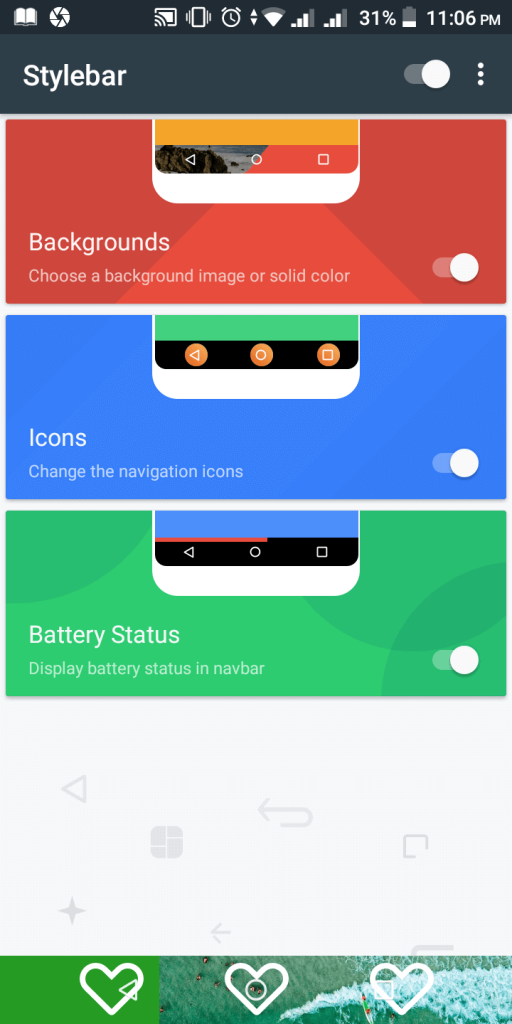
By using this app, you can change the menu bar of your mobile in different colors and change the icon. Open the app after downloading. After opening, 3 options will show Backgrounds, then Icons, then Battery-Status.
Backgrounds of the bar can be changed with the first one and icons of the bar can be changed with the second one. We need to keep these essential apps in our phones. So if you don't have all these necessary apps on your smartphone then you can get into a lot of trouble.
No comments